
The World of Xu
All 30 zones, from the Xu Outpost to The Reach. Difficulty climbs as you journey outward from the safe green heartland into the Xu war-cities, the dimensional rifts, and the post-cap endgame.
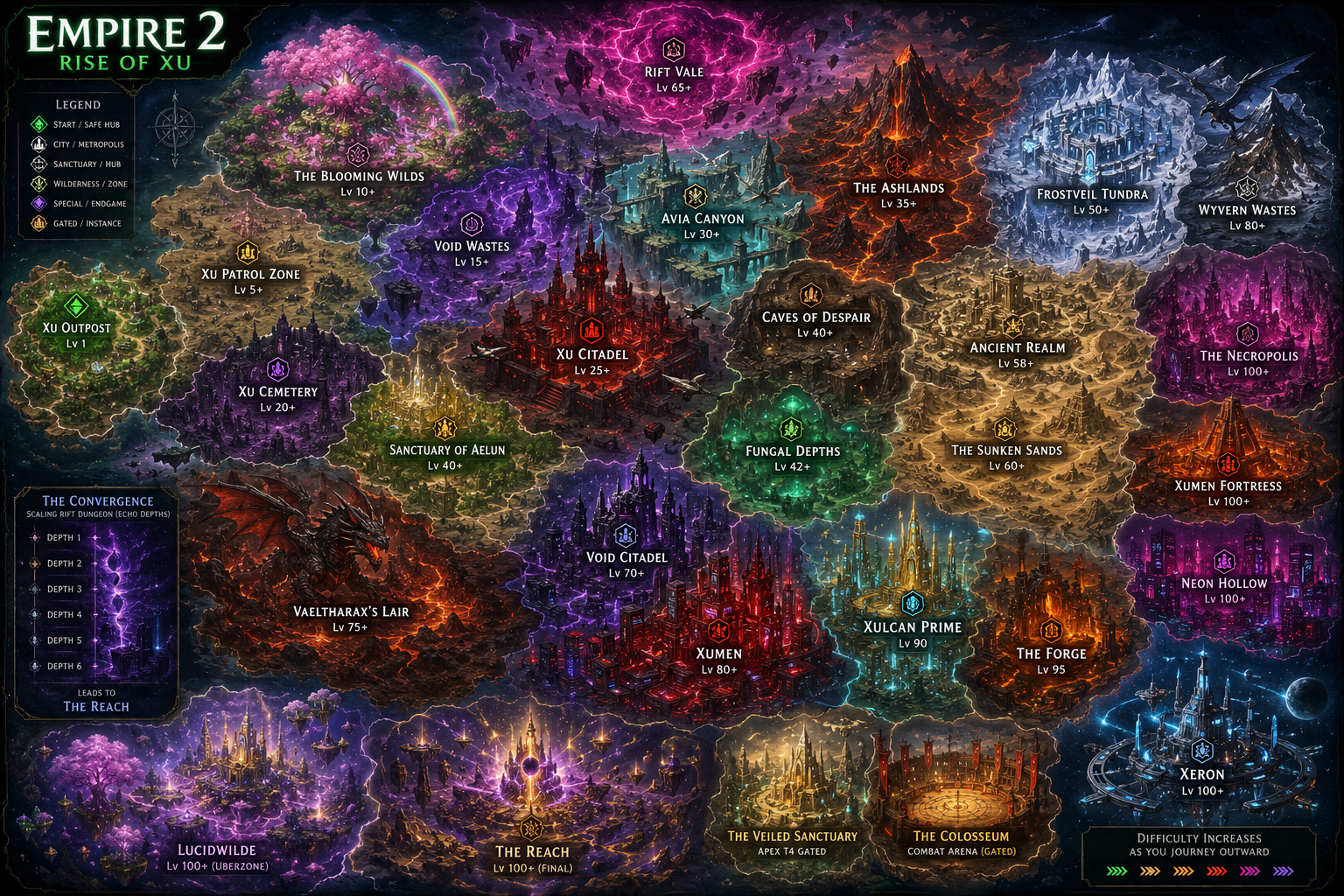
Tap the map to open it full size
So you woke up in the Xu war
A complete guide for first-time players: what to do, where to go, what every button does, and how not to die in your first ten minutes.
Table of Contents
- Getting Started
- Pick Your Class
- Pick Your Race
- Controls You Need to Know
- Reading Your HUD
- Your First 10 Minutes
- Combat Basics
- Skills & the Loadout
- Leveling & Progression
- Items, Gear & Rarity
- Zones & Where to Go Next
- Bosses (and Surviving Them)
- Multiplayer Co-Op
- PvP in the Colosseum
- Pro Tips New Players Miss
- FAQ & Troubleshooting
01 · Getting Started
Empire 2: Rise of Xu is a real-time action RPG. You play a soldier dropped into a war-torn alien world, and your job is to fight, loot, level up, and eventually take down the bosses keeping the Xu empire in power. Think classic top-down ARPG: click to attack, dodge with a roll, press numbers to cast skills.
There's no install, no signup gate, no tutorial wall. Click PLAY NOW on the homepage, pick a class and race, and you're in. The whole thing runs in your browser.
Use a desktop browser if you can. Chrome, Firefox, and Edge all work. The game is playable on mobile but you'll have a much better time with a keyboard and mouse.
02 · Pick Your Class
Class is the biggest decision you make at character creation. There are four, and they play very differently. You can always make alts later — your character roster is unlimited.
⚔ Warrior
Melee · Tank · EasyBig HP, big sword, big numbers. Walk up to things and hit them until they fall over. The recommended class for first-time players — you can take a few hits while you're learning, and your starter skill (Slash) does great damage with no setup.
🔮 Mage
Ranged · Glass Cannon · MediumSquishy but devastating at range. Throws bolts, calls down lightning, freezes packs. Manage your mana and stay back. If you like dodging more than tanking, this is your class.
✨ Healer
Hybrid · Support · MediumHeals yourself with every skill, scales with magic damage, has lifesteal and damage shields. Great solo and indispensable in co-op. The Divine Channel talent branch turns you into a sustained-cast spell machine.
🗡 Rogue
Burst · Mobile · HardHighest single-target burst, lowest HP. Built around the Dash skill — close gaps, hit hard, disengage. Rewarding once it clicks but unforgiving against bosses that don't telegraph.
First playthrough: Warrior. Big HP pool gives you breathing room to learn the systems. You can always reroll — characters are free to make.
03 · Pick Your Race
After you pick a class, you pick a race. There are 8 races and each one comes with a unique racial ability you press with E. Race also gives passive stat bonuses and a small flavor flaw.
The races (full details on the Races tab):
- Human — Balanced, no big strengths or weaknesses. Safe pick.
- Xu — Crest Flare: AOE fear that makes nearby enemies flee. Great for crowd control.
- Vampire — Aether Light: brief invincibility + lifesteal burst. Built around staying low HP.
- Centaur — Charge (passive): run in a straight line for 3 seconds, then your next melee hit deals +200%. No E key — happens automatically.
- Minotaur — Vreth Stance: damage reduction toggle. Stand and trade.
- Ogre — War Chant: party-wide damage buff. Best in multiplayer.
- Wraith — Phase-shift movement, ignores some terrain. Fragile but fast.
- Construct — Synthetic body, resistant to elemental damage. Slow.
For your first character, Human or Xu are the easiest to play. Centaur is great because the racial works automatically — no button to remember.
04 · Controls You Need to Know
You don't need to memorize everything. These are the ones that matter:
Movement & Combat
- W A S D
- Move your character
- Mouse
- Aim — your character faces wherever your cursor is
- LMB
- Basic attack (auto-repeats while held)
- RMB
- Block — hold to reduce incoming damage. Costs stamina-ish; uses your weapon's block or a shield if equipped.
- Space
- Dodge roll — brief invincibility, great for getting out of telegraphed AOE attacks. Has a short cooldown.
- E
- Racial ability (varies by race — see above)
Skills
- 1 – 8
- Cast equipped skill in that slot
- K
- Open the skill loadout (drag skills onto slots)
- N
- Open the talent tree (spend talent points)
Consumables (Item Bar)
- F
- Use a health potion from your inventory (also opens dialog with nearby NPCs)
- Z X C V G
- Item bar slots — drag consumables here from inventory, then press the matching key to use
Menus
- I
- Inventory — gear, consumables, lightstones
- Q
- Quest log
- P
- Stat points (spend on STR / VIT / AGI / INT / DEF)
- C
- Crafting bench (when you're standing at one)
- Y
- Achievements
- L
- Stats & leaderboard
- G
- Guild panel
- O
- Dialogue log (re-read conversations you missed)
- H
- Help menu (full in-game controls reference)
- Esc
- Close menus / return to lobby
- F5
- Save game (it also auto-saves periodically)
05 · Reading Your HUD
Top Bar
One horizontal strip across the top of the screen with everything you need at a glance: your character avatar, name, class, title, HP bar (green/red) and MP bar (blue) with current/max numbers, your level, available talent points, your gold count (◇), and your echo shards (💎, only earned in The Convergence). On the right side: current zone name, in-game timer, FPS counter, and a ← LOBBY button to bail back to character select. Two small icons (⚙ settings, ? help) sit in the middle.
Bottom — Skill Bar
Eight numbered slots (1-8) for your equipped skills. Cooldowns sweep across the icon when a skill is on recovery. The big slot near the bar showing your race icon is your racial ability — press E to fire it.
Bottom — Item Bar
A separate row of slots labeled Z X C V G for consumables. Drag health potions, mana potions, scrolls, or food into these slots from your inventory. Press the matching key to use the item in that slot. Press F to use a health potion from your inventory directly without needing to put it on the bar.
Bottom-Right Minimap
Shows your zone. Your character is the green dot in the center; enemies and points of interest appear as colored markers. The legend can be toggled with the icon in the corner.
Chat Panel (bottom-left, optional)
Combat log, loot pickups, level-ups, boss messages, and multiplayer chat. You can resize it with the S/M/L buttons or hide it entirely.
06 · Your First 10 Minutes
- Spawn in the Xu Outpost. This is the hub — safe, no enemies, full of NPCs. Walk around, talk to a few people with F.
- Find the Patrol Zone portal. It's a glowing orange ring labeled "XU PATROL ZONE" — usually to the east. Walk into it.
- Kill 3-5 weak mobs. Bandits, scouts, rebels. Use LMB. Don't bother with skills yet — your basic attack is enough for these.
- Loot drops. Items glow on the ground. Walk over them to pick up. Gold pickups are automatic.
- Level up. Probably level 2-3 after a few kills. A LEVEL UP burst plays. You get stat points and (every few levels) a skill point.
- Press I. Equip anything better than your starter gear. Compare item stats — green numbers mean upgrade.
- Press P. Spend your stat points. For your first character, pump VIT (HP) and your damage stat (STR for Warrior, INT for Mage/Healer, AGI for Rogue).
- Press K. If you've unlocked a new skill, drag it into a number slot.
- Keep pushing. Patrol Zone goes to about level 8-10. When it stops feeling dangerous, head to the next zone.
Don't run into the middle of a pack of 5+ enemies on a fresh character. Pull one or two at a time by approaching slowly. If your HP drops below half, back off and press F to drink a health potion — or open inventory (I) and drag a potion onto your item bar slot (Z/X/C/V/G) so you can hotkey it during fights.
07 · Combat Basics
The Combat Loop
Empire 2 is real-time. You're always free to move while attacking, blocking, or dodging. The classic flow:
- Aim with the mouse — your character always faces the cursor
- Walk into range (melee) or stay back (ranged)
- Hold LMB to auto-swing
- Press Space to dodge incoming telegraphed attacks (red rings on the ground = AOE about to happen)
- Press 1-8 to cast skills when off cooldown
- Block (RMB) when you can't dodge in time
Damage Types
Different attacks deal different types: physical, fire, ice, lightning, holy, poison. Some enemies resist certain types. The damage label color tells you the type (orange = fire, blue = ice, etc.).
Crits & Combos
Critical hits double your damage and show with a ! on the number. Your combo counter builds up with consecutive hits — at x3 you get a +10% bonus, at x6 you get +30%, at x10 you get +50% and a screen shake. Don't break the combo by missing.
Status Effects
You can burn, poison, freeze, shock, stun, or bleed enemies. Stunned enemies stand still — free hits. Frozen enemies can't move. Burning enemies take damage over time. Watch your damage label colors to know what status is ticking.
08 · Skills & the Loadout
There are 62 skills in the game across all classes. You don't unlock them all — you pick from your class's pool as you level up. Skills go into the 8 slot bar (1-8 keys).
How to Equip a Skill
- Press K to open the skill loadout
- You'll see your unlocked skills on the left, the 8 slots on the right
- Drag a skill onto a slot, or click the skill then click a slot
- Close the panel (Esc) — the slot now responds to that number key
Mana Cost & Cooldown
Each skill costs MP and goes on cooldown after you cast it. Mana regenerates over time. If you spam skills, you'll run out of mana — that's where MP potions and the mpRegen stat from gear come in.
Choosing Skills Early
For your first few levels, equip:
- One AOE skill for pack clearing (Warrior: Whirlwind; Mage: Fireball / Ice Nova; Healer: Smite AOE; Rogue: Blade Flurry)
- One single-target burst for elites and bosses
- One mobility skill if your class has one (Dash, Charge, Teleport)
- One defensive skill (heal, shield, block reinforcement)
Full skill catalog on the Skills tab.
09 · Leveling & Progression
You progress on three parallel tracks: character level, talent points, and ascendancy points. Each one matters and each unlocks at a different pace.
Character Level (XP)
Kill enemies, gain XP, level up. Every level you get:
- HP and MP pool increases automatically
- 2 stat points to spend (P menu)
- Every few levels: a new skill becomes available
- Every 10 levels: a major milestone (gear unlocks, talent slots open)
Stat Points — Where to Spend Them
- STR — physical damage (Warrior primary)
- VIT — max HP (all classes — keep some here)
- AGI — crit chance + dodge (Rogue primary)
- INT — magic damage + max MP (Mage and Healer primary)
- DEF — flat damage reduction (good for tank builds)
Talent Tree (N)
192 talents across all classes — each class has 8 branches with 6 nodes each. You earn talent points as you level. Talents are where your build actually happens: lifesteal, cooldown reduction, crit damage, elemental specialization, etc.
For new players: don't worry about the math. Pick a branch that sounds cool and stick with it for the first 10 levels. You can respec later if it doesn't feel right.
Ascendancy (Endgame)
26 ascendancy nodes unlocked after level 50. These are big bonuses that fundamentally change how your build feels. You don't need to think about ascendancy until much later — just know it exists.
10 · Items, Gear & Rarity
There are 364 items in the game. They drop from enemies, bosses, chests, and crafting. Rarity goes:
- Common (white) — vendor trash, sell it
- Uncommon (green) — slight upgrades, useful early
- Rare (blue) — solid mid-game gear
- Epic (purple) — strong, often with a unique effect
- Legendary (orange) — endgame staples
- Mythic (red) — rare endgame drops, build-defining
- Convergent (cyan) — drops from The Convergence, scales with depth
- Stormforged (gold) — drops from Overseer of Discord. The new top tier.
Equipment Slots
Weapon, off-hand (shield or second weapon), helm, chest, gloves, boots, two ring slots, amulet. Lightstones are socketable into weapons for bonus effects.
Sets (14 of them)
Wearing 2 or 4 pieces of a set gives bonus effects. Check the Sets tab — set bonuses can carry an entire build.
Crafting
27 recipes across 4 crafting stations (Forge, Alchemy, Enchanter, Smithy). Press C when standing at a station. Craft materials drop from enemies in zone-specific patterns.
11 · Zones & Where to Go Next
There are 28 zones. Each has its own enemy mix, environment, mini-boss, and loot table. Recommended progression:
- Xu Outpost — your safe hub. Always returnable.
- Xu Patrol Zone — levels 1-10. First zone, beats up bandits and basic mechs.
- Cemetery or The Ashlands — levels 10-20. Undead and lava.
- Void Wastes — levels 20-30. Eldritch enemies, harder mechanics.
- The Citadel / Caves of Despair — levels 30-50. Real challenge spikes.
- Rift Vale / Dragon Lair — level 50+. Endgame zones.
- The Convergence — infinite-depth dungeon. Each depth gets harder. THE endgame grind.
- Colosseum — the PvP arena (see below).
Each zone has its boss listed on the Bosses tab. If a zone has a red warning saying "Recommends Lv.X+", trust it — you'll get crushed otherwise.
First time entering a new zone gives +3× XP on your first kill there. Hop around early to chain those bonuses.
12 · Bosses (and Surviving Them)
There are 37 bosses: 30 lair bosses and 7 roaming world bosses (Forge Tyrant, Eyexor, Hollow Reaper, Void Behemoth, Abacus of Flesh, the apex Overseer of Discord, and Electronoid). World bosses spawn periodically — every 5 minutes after the first one — and any player in the zone can fight them.
How to Not Die
- Watch the telegraphs. Red circles on the ground = AOE about to land. Move out before they fill.
- Dodge with Space. The roll has invincibility frames.
- Block big hits. If you can't dodge, hold RMB to reduce damage.
- Stay mobile. Standing still in a boss fight is a death sentence.
- Save your big skills. Use AOE for adds, single-target burst on the boss itself.
- Stock potions. Buy them from vendors before the fight.
Phases
Most bosses have phases at HP thresholds — when HP drops to 50%, 25%, etc., the boss gets new attacks. Watch for screen shake and visual changes. The boss bar at the top of the screen tells you the current phase.
Loot
Boss kills drop set pieces, mythics, and crafting materials. World bosses drop the highest tier items (Loot Tier 3-8). Killing the Overseer of Discord drops the Stormforged set directly.
Don't fight a boss while still under-leveled. Check the boss's recommended level in the Bosses tab — being 5 levels below is usually a wipe.
13 · Multiplayer Co-Op
Empire 2 has multiplayer. Up to several players can run together in the same zone, share XP and loot, take down bosses together. Multiplayer uses a public server, so you'll see other players online by default.
How It Works
- When you enter a zone, you'll see other players standing or running around — they're real people, not bots
- Damage you deal to enemies counts toward kills; XP and gold are split among nearby party members
- World boss kills give credit to everyone who participated
- You can chat in the bottom-left chat panel
- Form a guild (G) for shared XP bonuses
Etiquette
- Don't pull a giant pack onto someone solo-farming if they look low-level
- World boss spawns — let everyone who showed up get a hit in
- The chat is global within a zone; be cool
14 · PvP in the Colosseum
The Colosseum is a dedicated PvP arena. Player-vs-player combat. Death there teleports you back to the arena entry with full HP — no gear loss, no XP loss, just a death counter bump.
The Colosseum is also where the Overseer of Discord world boss spawns. It's an apex fight under his storm — and any other players in the arena can attack you while you're fighting it. Risk and reward.
Dying to the Overseer of Discord (not to a player) sends you to the outpost with the normal death penalty. Only dying to another player uses the no-penalty PvP respawn.
15 · Pro Tips New Players Miss
- The dodge roll has invincibility frames. You can iframe through almost any attack with good timing. Practice on small mobs first.
- Blocking reduces damage but doesn't make you invincible. Big telegraphed attacks should still be dodged, not blocked.
- Status effects stack with damage. A burning enemy still takes hit damage. Apply DOTs early in a fight and let them tick.
- First kill in a new zone = 3× XP. Hop zones to chain this.
- Higher difficulty = better loot. If you're farming for legendaries, push to harder zones where you can still survive — not the easiest zone.
- Save F5 before you do anything risky. Manual save covers you if something goes wrong.
- The minimap shows enemy density. Avoid yellow clusters if you're low on HP.
- Talent respec is possible. Don't agonize over your first talent choices — try things.
- Crafting materials stack in your inventory. Don't sell them by accident. The little gear icon means it's a crafting reagent.
- The Convergence is the real endgame. Once you're 50+, every run goes deeper. Modifiers stack, HP scales, drops get crazier.
16 · FAQ & Troubleshooting
Is this free?
Yes. No ads, no microtransactions, no signup. Just play in your browser.
Can I save my character?
Yes — saves are local to your browser. Press F5 to save manually; the game also auto-saves periodically. Clearing your browser data will wipe your characters, so don't do that without backing up.
Why am I lagging?
Try lowering graphics settings (gear icon in the top-right). Particle effects and bloom are the most expensive — disabling them helps. Also try Chrome — it tends to perform best.
Can I play with my friend?
Yes — both of you join, head to the same zone, and you'll see each other. Form a guild for shared XP bonuses.
Is there controller support?
Yes, the game supports gamepads. Check the Controls page for full mappings.
I died and lost stuff. What happened?
Dying outside the Colosseum has a small penalty: some gold and a small XP loss, plus your gear stays on the ground briefly. Pick it up where you died.
Where do I report a bug?
Find the dev (Bofis) on itch.io — comments on the game page are read.
⚡ World Bosses
Ephemeral · Cross-zone · Shared loot · Multi-player
💀 Lair Bosses
Zone-locked · Phase-shifting · Per-player rewards
⚜ Ascendancy
Once you hit level 100, all further XP routes to Ascendancy. Earn AA points to unlock universal nodes (available to every class) or class-exclusive nodes tailored to your build. Each node has a required AA total before it is unlockable and costs points to take.